


One UI 9 rollout: what Samsung has actually confirmed
Samsung began the official One UI 9 expansion on September 16, 2026, starting with the Galaxy S26, S26+ and S26 Ultra in markets where the rollout was ready. One UI 9 had already debuted on the Galaxy Z Fold8 Ultra, Z Fold8 and Z Flip8. Samsung says the software will gradually reach more Galaxy devices.
The word “gradually” matters. Samsung’s own regional newsrooms publish different timing. The global and U.S. announcements describe rollout beginning September 16, while Samsung Australia says its local rollout begins from the end of September. Carrier approval, country certification and device variant can all move the date.
Do not trust a single global date list. Samsung has not published one master schedule covering every supported Galaxy model, carrier and country. Treat any exact date for an unconfirmed device as provisional unless Samsung or your carrier publishes it.
Confirmed devices and beta-eligible devices are not the same thing
| Status | Devices Samsung has named | What that means |
|---|---|---|
| One UI 9 already debuted | Galaxy Z Fold8 Ultra, Z Fold8, Z Flip8 | Official software already associated with these new foldables |
| Official rollout started | Galaxy S26, S26+, S26 Ultra | Rollout timing still varies by region/carrier |
| September beta expansion | Z Fold7, Z Flip7, S25, S25+, S25 Ultra, S25 FE | Beta eligibility is evidence of active testing, not a universal stable-release date |
Samsung’s September 1 UK beta announcement lists India, Korea, the U.K. and the U.S. among the select markets for the expanded beta program. A phone being in a beta program is a strong sign of software work, but it should not be presented as a promise that every carrier variant will receive the stable build on the same day.
What is new in One UI 9?
Samsung’s release focuses heavily on Galaxy AI and practical device-management features rather than a visual redesign alone. My FanCam can track a selected person in recorded video and reframe the footage to keep that subject centered. The feature is designed for concerts, sports and other scenes where the person you care about moves around the frame.
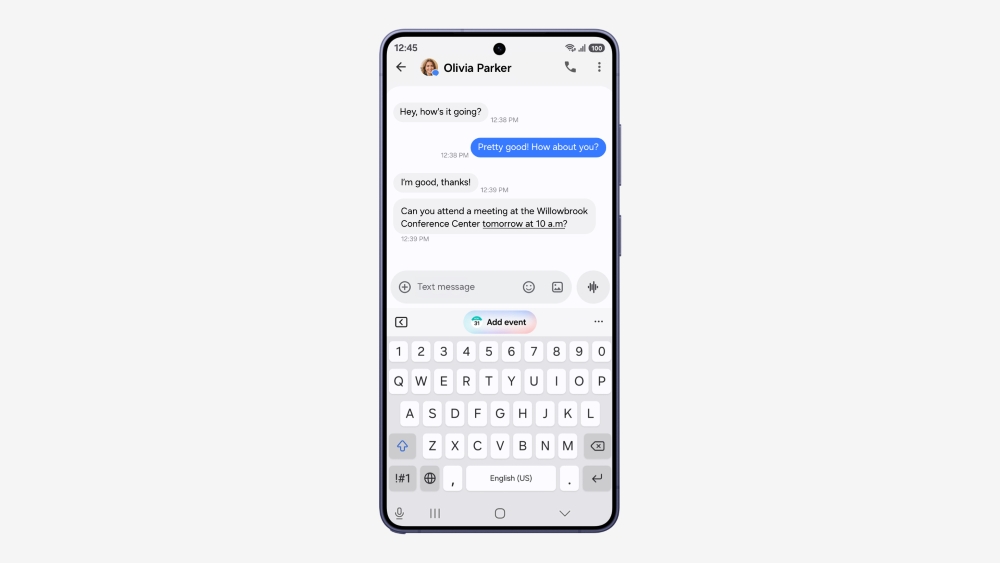
Now Brief gets more editable and generative cards, while Warranty and care centralizes device-support information. Samsung also highlights Now Nudge, improvements to Interpreter Thread View, Document Scan, more structured Voice Recorder summaries, Security Brief, Privacy Alerts and broader Scam Detection support.
Availability is not uniform. Samsung repeatedly notes that features can vary by country, language, model and network, and some AI functions require a Samsung Account or network connection. A phone receiving “One UI 9” therefore does not mean it receives every advertised AI feature.
How to check for One UI 9 safely
Samsung’s U.S. support instructions direct users to open Settings → Software update and then choose Check for updates or the equivalent option shown by the carrier. On some models and regions, the wording may be Download and install.
Before you install
1. Back up important photos, documents and authenticator/recovery information.
2. Charge the phone and keep enough free storage for the update.
3. Prefer stable Wi‑Fi if your carrier requires it or the package is large.
4. Update important banking, work and security apps first.
5. Do not sideload random firmware packages from links shared on social media.
6. After installation, check Settings → About phone → Software information to confirm the installed One UI version.
1. Back up important photos, documents and authenticator/recovery information.
2. Charge the phone and keep enough free storage for the update.
3. Prefer stable Wi‑Fi if your carrier requires it or the package is large.
4. Update important banking, work and security apps first.
5. Do not sideload random firmware packages from links shared on social media.
6. After installation, check Settings → About phone → Software information to confirm the installed One UI version.
Why One UI 9 may not appear on your phone yet
If your device is expected to receive the update but the updater says you are current, the most likely explanation is staged rollout. Samsung and carriers often release major software in waves so they can pause deployment if a serious problem appears.
Other reasons include a carrier-specific build that has not been approved, a different regional model code, participation in a beta track, insufficient storage or simply that Samsung has not yet announced your device’s stable-release window.
A VPN generally does not transform one regional firmware branch into another. Trying to force an update by flashing firmware from an incompatible region can create support, carrier or data-loss problems. Waiting for the official package is the safer choice for most users.
A note on Privacy Alerts and feature-support lists
Samsung has published support information for specific One UI 9 features that names devices such as the S26 and S25 families, S24/S23 generations, several recent Fold/Flip models and Tab S series devices. That kind of list should be read as feature support information, not automatically converted into a complete global software-update schedule.
This distinction is easy to lose in viral “eligible device” lists. A feature page can tell you which hardware supports a function once the required software is present; it does not necessarily tell you when your exact carrier build will receive the OS update.
Should you join the beta instead of waiting?
If Samsung Members offers the One UI 9 beta for your supported device and region, it can be useful for enthusiasts who want features early and are comfortable reporting bugs. It is less suitable for a phone you rely on for critical work, travel, banking or authentication.
Beta software can introduce battery drain, app incompatibility, camera regressions or connectivity bugs. Before joining, read Samsung’s local beta terms, back up the phone and make sure you understand the rollback process.
What to check after the update
Give the phone time to finish post-update optimization. Battery usage can look unusual for a short period while apps re-index and background tasks settle. Then check your primary apps, Bluetooth devices, Android Auto, VPN, work profile and camera modes.
If something is missing, remember that Samsung can gate an AI feature by model, language, country or account. Check Samsung’s regional support page before assuming the installation failed.
Methodology and limitations
This guide uses Samsung Global Newsroom, Samsung regional newsrooms and Samsung’s official support documentation. Digital Pulse Brief separates stable-rollout confirmation, beta eligibility and feature-support lists because Samsung has not published one universal schedule for every Galaxy device and market.
Rollout timing can change. The most reliable final authority for a specific handset is the update screen on that device plus Samsung or the carrier’s regional support notice.
Bottom line
One UI 9 is officially rolling out, but the correct way to track it is by device + market + carrier, not by a single viral calendar. The Galaxy S26 family is at the front of the expansion, the latest Fold8/Flip8 generation already introduced the software, and several S25/Fold7/Flip7 models have participated in the expanded beta program.
Check through Settings, use official firmware channels, and treat feature lists and beta lists as evidence — not as guaranteed stable-release dates.
Primary sources
MORE FROM DIGITAL PULSE BRIEF