
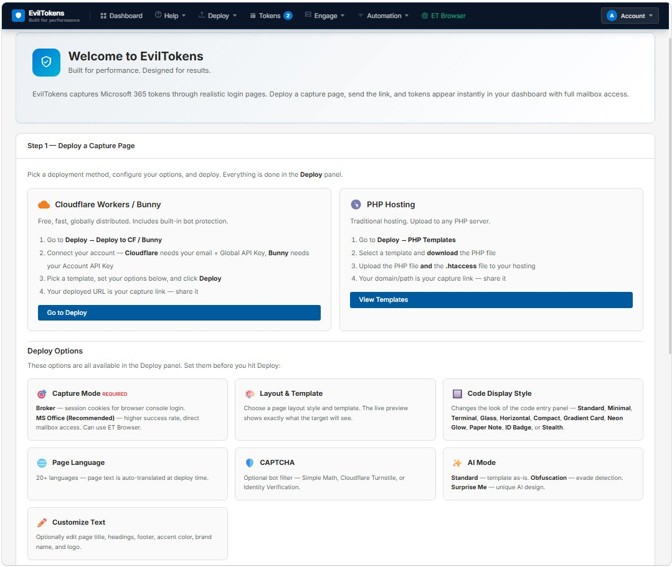
Microsoft disrupted EvilTokens after a rapid global run
Microsoft says EvilTokens emerged in February 2026 and quickly became one of the most widely used phishing-as-a-service platforms targeting Microsoft 365 accounts. By the time Microsoft and its partners moved against the infrastructure in September, the service had been linked to more than 12,000 compromised inboxes across more than 10,000 organizations.
The campaign mattered because it did not depend on stealing a password in the familiar sense. EvilTokens abused Microsoft’s legitimate device-code authentication flow. Victims were tricked into entering a code at a real Microsoft sign-in page, and that action could authorize an attacker-controlled session. A user could therefore complete normal authentication — including multifactor authentication — while still granting access to the wrong session.
Microsoft’s Digital Crimes Unit says it seized 50 websites used by the service and disabled more than 150 additional domains associated with its infrastructure. UK police also arrested two men in connection with the alleged operation. Those enforcement actions disrupt the service, but they do not make device-code phishing disappear as a technique.
Why this matters: EvilTokens turns a legitimate authentication flow into the social-engineering surface. The defensive question is not only “Did MFA run?” but also “Which session did the user just authorize, from where, and what happened immediately afterward?”
How device-code phishing works without asking for your password
Device-code authentication exists for devices or environments where typing a password directly is inconvenient. A legitimate application requests a short code. The user opens a trusted sign-in page on another device, enters the code, authenticates, and the requesting application receives a token.
EvilTokens inserted the attacker into that sequence. The attacker initiated the device flow first and delivered the code through a phishing lure. The victim was then guided to the legitimate Microsoft authentication experience. When the victim entered the attacker’s code and approved the sign-in, the resulting token could be delivered to the attacker-controlled session.
This distinction is important. The victim is not necessarily typing credentials into a fake login page, so traditional advice such as “check the domain before entering your password” is not enough. The Microsoft domain can be genuine while the transaction is malicious.
| Stage | What the victim sees | What the attacker gains |
|---|---|---|
| Lure | Invoice, RFP, shared file or another business pretext | A path to start the device-code flow |
| Code entry | A legitimate Microsoft sign-in page | Authorization for the attacker’s pending session |
| Post-compromise | Often nothing obvious | Mailbox access, reconnaissance and persistence while the token remains valid |
Where AI changed the economics of the attack
Microsoft’s analysis shows that EvilTokens was more than a token-stealing panel. Its operators added AI-assisted workflows that could help criminals tailor lures and make sense of compromised mailboxes. Post-compromise, the service could help sift through email activity, identify high-value financial conversations and map organizational relationships using Microsoft Graph.
That is a meaningful shift in attacker economics. Reading thousands of stolen messages manually is slow. Automating triage can make it easier to identify finance staff, executives, suppliers, active invoice threads or other conversations where impersonation could produce a payment. The AI component does not create the underlying access; it helps criminals prioritize what to do with access once they have it.
Microsoft says the toolkit offered 44 themes for phishing templates and landing pages. Campaigns were observed across wholesale distribution, construction, financial services, real estate, higher education and healthcare, with the highest concentrations of victim activity in the United States, Canada, the United Kingdom, Australia, India and France.

Does EvilTokens mean MFA is useless?
No. The more precise conclusion is that some authentication flows can be socially engineered even when MFA is present. EvilTokens abused the authorization process rather than defeating every form of MFA cryptographically.
Phishing-resistant authentication — including passkeys and FIDO2 security keys — remains important because it reduces the usefulness of stolen credentials and makes many common phishing patterns harder. But identity security also needs policy controls around which authentication flows are allowed, where tokens can be used, and what happens after an unusual sign-in.
Microsoft specifically recommends blocking device-code flow where an organization does not need it. If Teams devices or other legitimate scenarios require device-code authentication, exceptions should be narrowly scoped instead of leaving the flow open across the whole tenant.
What Microsoft 365 administrators should do now
The fastest defensive win is to inventory whether device-code authentication is actually required. Organizations that do not need it should block the flow. Those that do should limit it to the specific accounts and resources that depend on it through Conditional Access.
Security teams should also look beyond the initial sign-in. Microsoft’s published detection guidance highlights behaviors such as suspicious Azure authentication through device-code phishing, anomalous device registration, unusual volumes of Microsoft Graph activity, and malicious inbox-rule creation after a suspicious authentication event.
Defender checklist
1. Block device-code flow unless there is a documented business requirement.
2. Narrow legitimate exceptions with Conditional Access.
3. Revoke suspicious sessions and refresh tokens after a confirmed compromise.
4. Review newly registered devices and suspicious inbox rules.
5. Investigate abnormal Microsoft Graph activity after device-code sign-ins.
6. Prefer phishing-resistant MFA such as passkeys/FIDO2 where supported.
7. Keep mail protections such as Safe Links, anti-spoofing controls and automated remediation enabled.
1. Block device-code flow unless there is a documented business requirement.
2. Narrow legitimate exceptions with Conditional Access.
3. Revoke suspicious sessions and refresh tokens after a confirmed compromise.
4. Review newly registered devices and suspicious inbox rules.
5. Investigate abnormal Microsoft Graph activity after device-code sign-ins.
6. Prefer phishing-resistant MFA such as passkeys/FIDO2 where supported.
7. Keep mail protections such as Safe Links, anti-spoofing controls and automated remediation enabled.
What ordinary users should watch for
A message that asks you to enter a device code should be treated as an authorization request, not as a harmless verification step. If you did not intentionally start a sign-in on a TV, command-line tool, shared device or another product that clearly uses device-code authentication, stop and confirm with your IT team.
Also be suspicious of urgent invoices, RFPs, shared-document prompts and supplier-payment messages that suddenly introduce a device code. Microsoft says EvilTokens used those kinds of business themes because they fit naturally into everyday workplace communication.
What the takedown changes — and what it does not
Taking down infrastructure raises the cost for the operators and their customers. Seizing domains can cut off active panels, landing pages and supporting services. Arrests can remove people from the ecosystem. But phishing-as-a-service is a market, not a single website.
Organizations should therefore treat the EvilTokens disruption as an opportunity to close the underlying identity gap. If device-code authentication remains broadly enabled and token behavior is weakly monitored, another service can attempt the same pattern under a different brand.
The bigger lesson is that identity defense increasingly has to validate authorization context, not only passwords. Attackers want reusable sessions and tokens because they can offer access without needing to replay credentials every time.
Methodology and limitations
This article is based primarily on Microsoft Threat Intelligence and Microsoft Digital Crimes Unit reporting published September 22, 2026. Digital Pulse Brief did not independently conduct forensic analysis of the EvilTokens infrastructure, so victim counts, disruption totals and platform capabilities are attributed to Microsoft. Law-enforcement actions are described as arrests/allegations rather than findings of guilt.
Our contribution is the attack-flow explanation, defensive prioritization and distinction between “MFA present” and “transaction securely authorized.”
Bottom line
EvilTokens is a useful case study in where phishing is heading. The dangerous part was not a magical AI that broke Microsoft authentication. It was the combination of a legitimate device-code flow, convincing business lures, stolen session tokens and AI-assisted inbox analysis that made compromise easier to monetize at scale.
For defenders, the response is concrete: remove unnecessary device-code exposure, tighten exceptions, monitor token and device behavior, and use phishing-resistant authentication where possible. For users, the simplest rule is equally concrete: never enter a device code you did not intentionally request.
Primary sources
MORE FROM DIGITAL PULSE BRIEF