Reviews · Updated September 16, 2026
Canva Pro Review 2026: Is $180/Year Worth It?
Canva Pro review 2026: Canva’s paid individual plan now combines premium templates and assets with Brand Kits, Background Remover, Magic Resize, Social Content Planner, 100GB of cloud storage, Affinity with AI, and a much larger AI allowance than Free. Canva AI 2.0 and Magic Layers also make the plan more ambitious than the version many users remember from a few years ago.
The question is whether those upgrades save enough time to justify US$180 per year for one person before tax. This independent review focuses on value, limits, real workflow benefits, and who should stay on Canva Free instead.
This review is not sponsored and contains no affiliate offer. Pricing, AI allowances and feature rollouts can change, so official Canva links are included where the detail matters.
Canva Pro review 2026: the quick answer
Canva Pro makes the most sense when Canva is part of your regular work, not an occasional design app. The strongest value comes from combining premium content with time-saving production tools: one-click background removal, instant multi-size resizing, brand controls, social scheduling and a substantially larger AI allowance. For a creator producing several deliverables every week, those minutes saved can add up quickly.
Best for
Solo creators, freelancers, marketers and small-business owners who create content every week and repeatedly use premium assets, resizing, background removal, branding and scheduling.
Stay on Free if
You design only occasionally, rarely use premium content, and can live with lower storage and a smaller AI allowance.
Main trade-off
Pro is feature-rich, but it is still a one-person plan and AI usage is allowance-based rather than unlimited.
Canva Pro price in 2026: what you get for $180/year
Canva’s U.S. pricing page currently lists Canva Pro at US$180 per year for one person, which works out to an effective $15 per month before tax when paid annually. Canva notes that taxes and regional pricing can differ.
- 3.6M+ templates, including premium templates
- 141M+ premium photos, videos, graphics and audio
- 5 Brand Kits
- 100GB cloud storage
- Social content scheduling
- 10× more AI usage than Canva Free for Premium or Ultra AI tools
- Affinity with AI
- Canva AI 2.0, Canva AI connectors, Components, Canva Offline and Magic Layers where available
| Plan | Annual US price | Storage | Best fit |
|---|---|---|---|
| Free | $0 | 5GB | Occasional design |
| Pro | $180 / one person | 100GB | Regular solo creators |
| Business | $250 / person | 500GB | Growing teams & advanced workflows |
Current U.S. annual prices shown by Canva as of September 16, 2026. Local currency, taxes and promotions may differ. See Canva’s official pricing page.
Canva AI 2.0 changes what “Pro” means in 2026
Canva Pro used to be easy to explain: more templates, more stock assets and a handful of convenience tools. In 2026, the pitch is broader. Canva AI 2.0 adds conversational design, agentic editing, persistent memory, layered object intelligence, connectors, scheduling, web research, Brand Intelligence, Sheets AI and Canva Code 2.0.
For a Pro buyer, that matters because Canva is moving from “design editor with premium assets” toward a workspace where ideas, research, branded content and publishing can happen in one place. The practical value depends on whether those AI workflows match your work; they are not automatically valuable just because they are new.
Canva’s official Canva AI 2.0 announcement explains the current feature set and rollout.

Magic Layers and Canva Pro AI limits
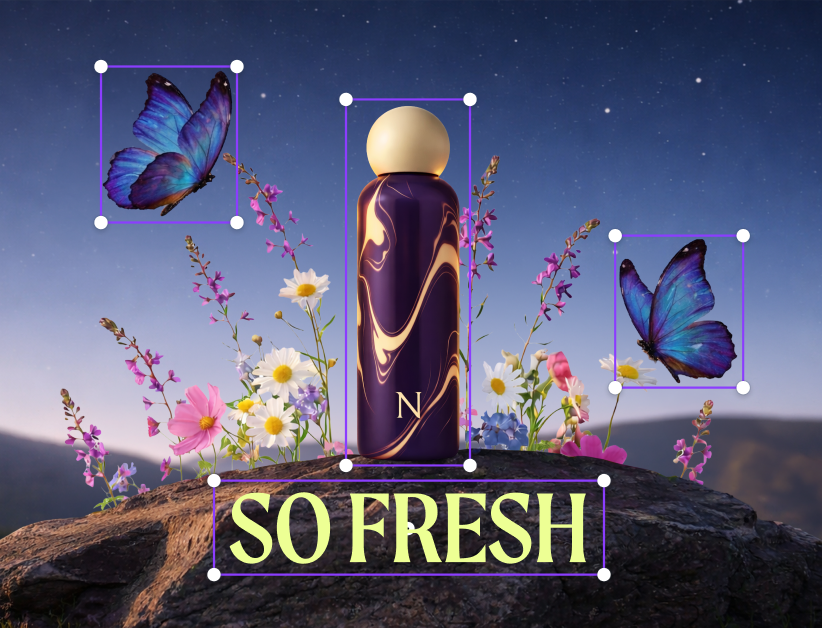
Magic Layers tackles a common frustration with AI images: a generated JPG or PNG usually arrives as one flat picture. Canva’s system analyzes that image and rebuilds the design into editable layers, restoring live text and separating visual objects so you can move, resize or restyle them.
That can be genuinely useful for social creatives, ads, campaign concepts and mood boards because it lets you keep a strong AI-generated composition without being trapped by its text or layout. Canva says Magic Layers is in public beta in the United States, United Kingdom, Canada and Australia, with wider availability planned, so availability can still vary by country. See Canva’s Magic Layers announcement.
“10× more AI” does not mean unlimited
Canva’s AI system uses allowances. Canva says some tools can be used abundantly on paid plans, while Premium and Ultra AI tools draw from a shared monthly allowance that varies by plan and resets each month. The pricing page currently describes Pro as offering 10× more AI usage than Canva Free, not unlimited AI.
Heavy AI users should monitor consumption rather than assuming the annual subscription removes every limit. Canva also offers an AI Pass add-on for additional allowance in supported billing setups. Canva explains the current system in its AI usage guide.
The everyday Pro tools may save more time than the headline AI features
AI gets the attention, but the boring production tools are often the strongest reason to pay. A creator who resizes, removes backgrounds and repackages assets several times a week can get predictable time savings even when they never touch the newest generative features.
Magic Resize
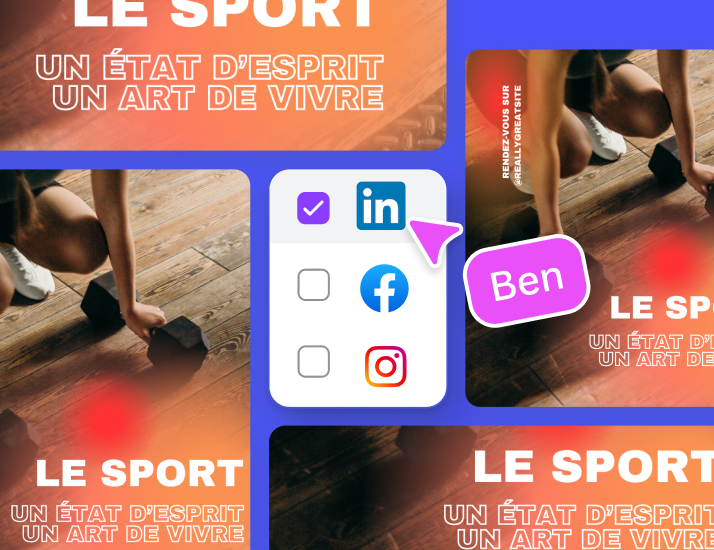
If you routinely turn one campaign into Instagram, LinkedIn, Facebook, story and banner versions, Magic Resize can remove repetitive canvas setup. You still need to check cropping and hierarchy, but the first pass is much faster.
Background Remover
For product shots, profile images and quick marketing graphics, one-click background removal is the kind of feature that pays back through repetition. Edge quality still depends on the source image, so difficult hair, glass and fine details may need manual cleanup.

Brand Kits, Content Planner and Canva Offline
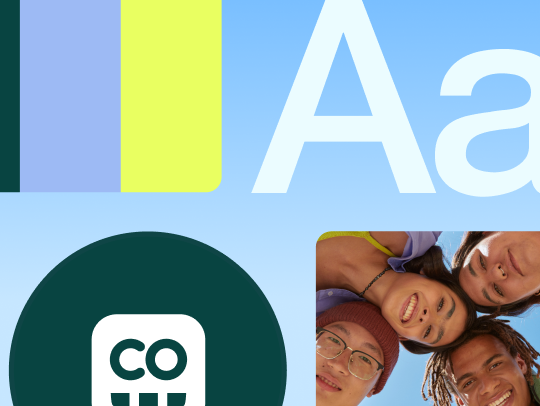
Canva Pro currently includes five Brand Kits. That lets a solo creator or freelancer keep multiple color palettes, fonts and logos organized instead of rebuilding brand settings each time. The limit also shows where Canva draws the line between Pro and Business: Pro is aimed primarily at individual creators, while Business expands brand and approval controls for larger workflows.
Social Content Planner
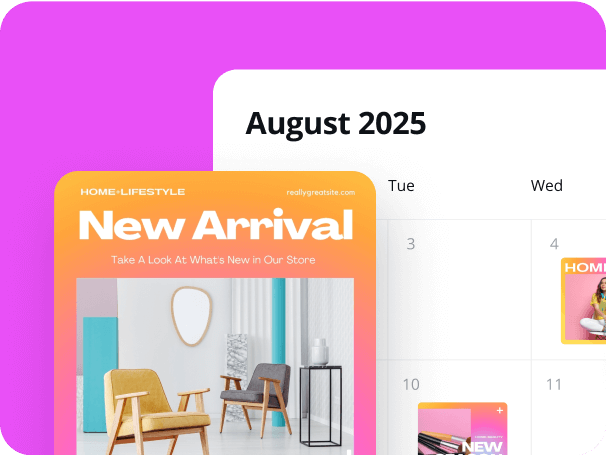
If you already design in Canva and then manually download, upload and schedule content elsewhere, publishing from the same workspace can reduce handoffs. If you already rely on a dedicated social suite with approvals and analytics, the Canva scheduler may be redundant.
Canva Offline
Canva Offline can help when you want to keep working on supported designs without a connection and sync later. It is useful for travel and unreliable Wi-Fi, but Canva remains a cloud-first platform: features that depend on online content, AI services, collaboration or cloud libraries can naturally be more limited without a connection.
Canva Pro vs Free, Business and the alternatives
Canva Pro vs Canva Free
Canva Free is no longer a bare demo. Canva lists 1.6M+ templates, 4.7M+ media assets, 5GB storage and limited AI usage on the free plan. Pro is better understood as a volume and workflow upgrade: more premium content, 100GB storage, five Brand Kits, scheduling, premium production tools, Affinity with AI and a 10× larger AI allowance than Free for eligible AI categories.
Choose Free when
- You make designs occasionally.
- You can work around premium-template restrictions.
- You do not need frequent background removal, resizing or scheduling.
- 5GB storage is enough.
Choose Pro when
- You publish every week or every day.
- You routinely use premium stock content and templates.
- You need consistent branding across several projects.
- You want 100GB storage and social scheduling.
- You repeatedly use AI, background removal, resize and other premium tools.
What Canva Pro does well
- Fast learning curve for non-designers
- Huge premium content library
- Strong time-saving tools for repetitive production
- Useful Brand Kits and 100GB storage
- Social scheduling built into the creation workflow
- Canva AI 2.0 and Magic Layers broaden what can be created
What to watch
- US annual price is $180 for one person
- AI allowance is not unlimited
- Some newest features are still rolling out by region
- Pro is primarily a solo plan; team governance lives higher up
- Templates can encourage generic-looking work if you do not customize them
- Advanced vector, color-management and prepress workflows may still require specialist software
Canva Pro vs Canva Business
Canva’s current U.S. annual pricing lists Business at $250 per person per year. Business raises the AI allowance to 20× Free, expands storage to 500GB, supports up to 100 Brand Kits and adds approvals and more advanced business tools. If you only need premium design tools for yourself, Pro is the cleaner buy. If approvals, brand governance, larger storage and team administration are part of your day-to-day work, Business is the plan Canva is steering you toward.
Canva Pro in the wider AI-tool budget
If your work is primarily visual, Canva Pro can replace a surprising number of separate template, stock-asset, resizing and social-publishing services. If your biggest need is writing, deep research or coding, compare that budget with our ChatGPT Plus Review 2026 and Claude Pro Review 2026. You can also browse more product analysis in our Reviews section.
Licensing matters
Canva Pro gives subscribers access to premium content under Canva’s content licences, but that is different from owning the underlying stock photo, graphic, video or audio. For client work, commercial projects, merchandise and other higher-stakes uses, read Canva’s licensing explainer instead of assuming every asset can be redistributed by itself.
Canva Pro review 2026: frequently asked questions
Canva’s U.S. pricing page currently lists Canva Pro at US$180 per year for one person before tax. Regional pricing, currency, tax and promotions can differ.
It can be, especially if you create content frequently and regularly use premium assets, Brand Kits, Background Remover, Magic Resize, scheduling, 100GB storage or the larger AI allowance. Casual users may be better served by Free.
No. Canva uses AI allowances. Pro currently provides 10× more AI usage than Free for eligible Premium or Ultra AI categories, and some tools have separate usage behavior.
Pro combines a much larger premium content library with 100GB storage, five Brand Kits, social scheduling, premium editing tools and a larger AI allowance. Free remains capable for occasional design.
Canva currently positions Pro primarily for one person. Canva Business is the more appropriate tier when a team needs approvals, larger storage, more Brand Kits, higher AI allowance and team administration.
Canva permits many commercial uses under its content licences, but restrictions apply. Review Canva’s current licensing terms for your exact use case, especially if you plan to sell products or redistribute assets.
Final verdict: is Canva Pro worth it in 2026?
For frequent solo creators, Canva Pro is easier to justify in 2026 than it was when Pro was mainly a premium-template upgrade. The current package combines an enormous content library with practical production tools, branding, scheduling, 100GB storage and a rapidly expanding AI layer.
The value is strongest when Canva is part of your weekly workflow and you repeatedly use the same time-saving features. The value is weakest when you design only occasionally, rarely use premium content, or already pay for specialist creative and social tools that duplicate the same functions.
Before paying, use Canva Free on your real projects for a week and note where you hit friction. If the friction is premium assets, background removal, resizing, storage, branding, scheduling or AI limits, Pro is solving a problem you can actually measure.
Editorial note: Digital Pulse Brief is not affiliated with Canva. Product specifications and pricing were checked against Canva’s official pages on September 16, 2026 and may change later.
DIGITAL PULSE BRIEF NEWSLETTER
Get clear AI, technology and business insights in your inbox
Breaking developments, practical explainers, reviews and useful tech intelligence — without the noise.
WHAT TO READ NEXT
iPhone 18 Pro Review: Apple’s Camera-First Flagship Is a Serious Upgrade  Samsung Galaxy Z Fold 8 Review: The Passport Foldable Finally Makes Sense
  Claude Pro Review 2026: Is It Worth $20/Month?
MORE FROM DIGITAL PULSE BRIEF