NVIDIA OpenShell and Sentry Explained: AI Agent Security, Requirements and Limits
NVIDIA OpenShell is an open-source runtime that places enforceable access controls around AI agents. Sentry adds a separate hardware-based monitoring and enforcement layer. NVIDIA announced the broader Open Agent Safety Platform on September 28, 2026, bringing these approaches together for organizations deploying agents that can use tools and act on business systems.
The useful question is what an agent remains able to do after it has been given a task. A sandbox can narrow that authority; it cannot decide whether every permitted action is sensible. This guide separates the launch claims from the configuration choices that determine practical protection. Source: NVIDIA’s announcement.
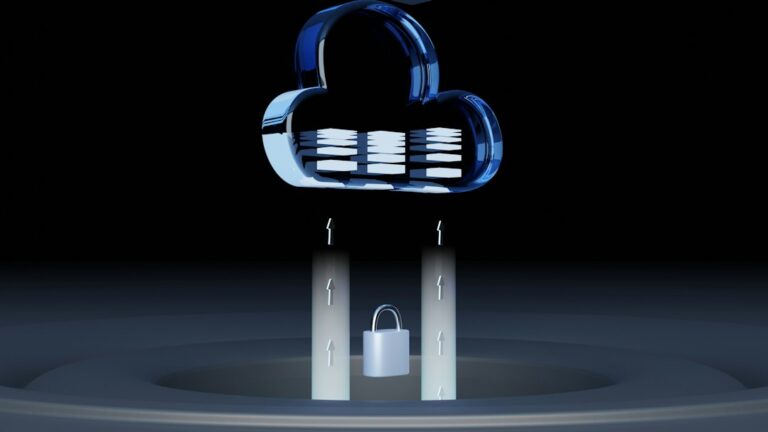
Researched September 28, 2026. This is a documentation-based explainer and editorial analysis, not a hands-on security evaluation. Editorial visuals are sourced from NVIDIA, NVIDIA Build, the official OpenShell repository, Cisco and EQTY Lab, with source credits shown below each image.
What matters first
- Start with permissions: define the files, services and operations each task actually requires.
- Separate the products: OpenShell is the runtime; Sentry is the additional infrastructure protection layer.
- Check enforcement: a rule that only records a violation is not a rule that stops it.
- Evaluate a real workflow: test allowed work, blocked work and recovery before giving an agent production authority.
OpenShell vs Sentry: what is the difference?
NVIDIA describes OpenShell as broadly available and provides the software through its developer resources and GitHub. Sentry is part of the platform’s reference system design. Treat the software download and the hardware deployment decision as separate workstreams; a launch announcement does not establish availability or pricing for every partner configuration.
Swipe the table sideways to compare all columns.
| Component | Main role | Evaluation question |
|---|---|---|
| OpenShell | Runs agents inside policy-controlled sandboxes. | Can the workflow finish with narrowly scoped access? |
| Sentry | Adds independent monitoring and enforcement on BlueField-4 DPUs. | Does the intended infrastructure support the required protection path? |
The distinction matters for procurement: evaluating a local runtime does not commit a team to buying an entire reference architecture. Equally, installing software alone does not reproduce an independent hardware trust domain.
What does NVIDIA OpenShell control?
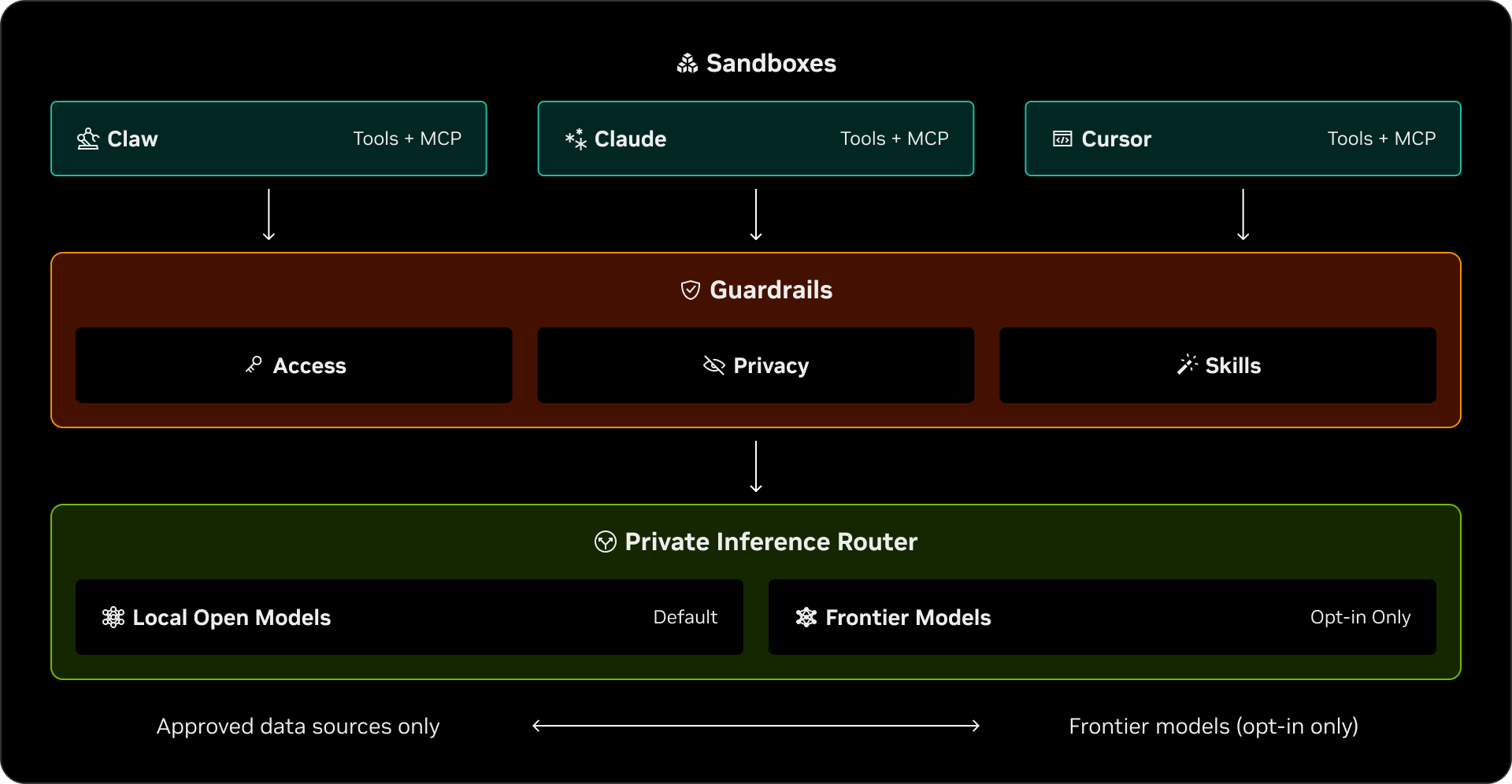
The OpenShell overview identifies filesystem, network, process and provider-credential controls. File rules specify permitted paths; process restrictions limit privileges and dangerous system calls; network rules constrain outbound destinations. Filesystem and process settings are established when a sandbox is created, while network policy can change during execution.
This is relevant because an AI agent can combine reasoning with tools. A task such as “investigate this failed build” may involve reading code, fetching packages, running tests and contacting an API. Those activities need different permissions.
Editorial example: a build-investigation agent may need to read a repository and write temporary test output. It should not automatically inherit the ability to publish a release, change billing settings or read unrelated customer exports. Define success and prohibited side effects before selecting the runtime settings.
A useful access review therefore begins with verbs: read, create, modify, delete, send and deploy. “Access to the repository” is too broad to express all of those differences.
How the sandbox, supervisor and gateway work
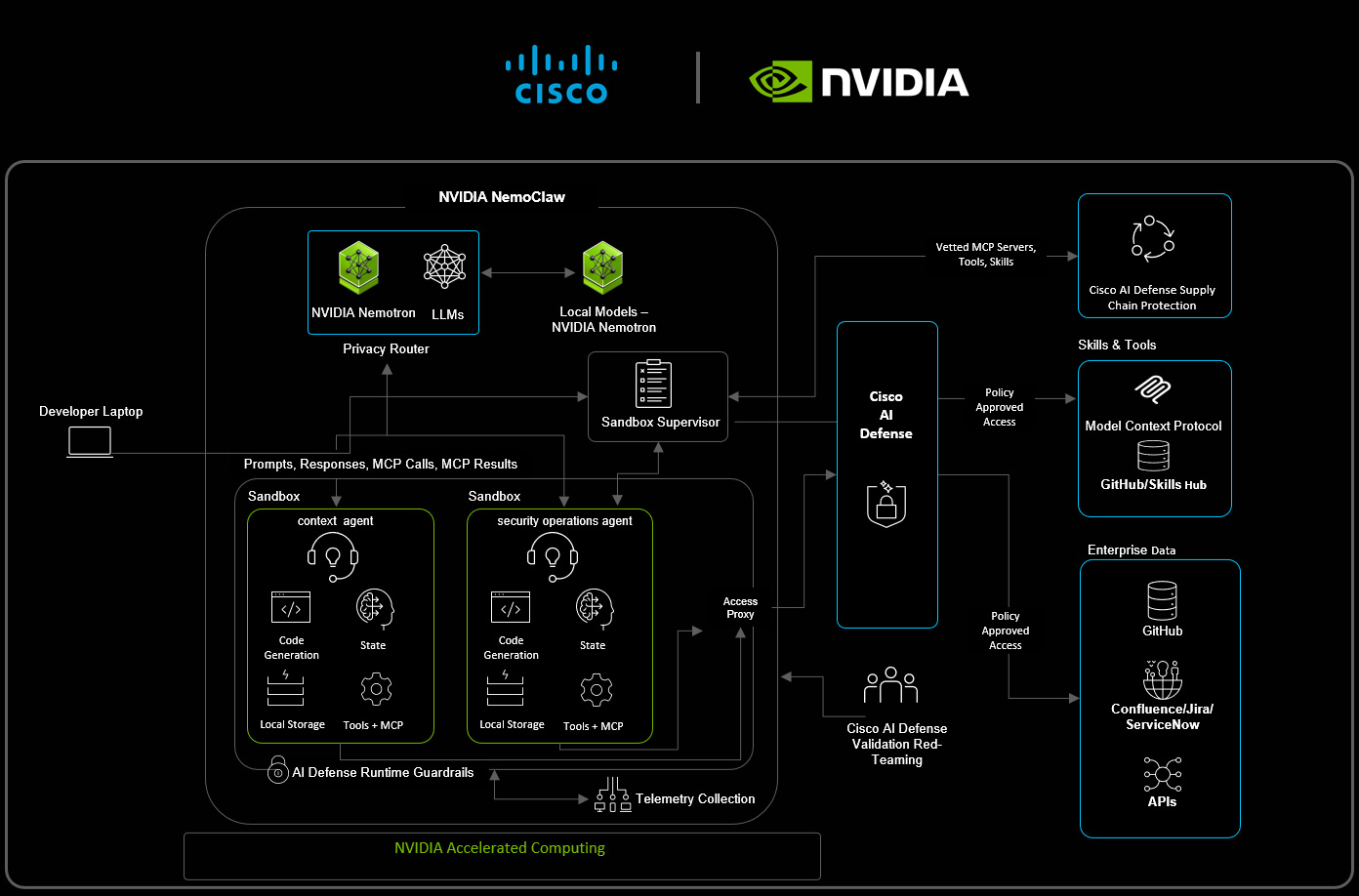
OpenShell separates three responsibilities. The sandbox contains the workload. A supervisor outside it checks requests and supplies authorized credentials. The gateway manages sandboxes, policy and operator access. The documented architecture prevents direct outbound networking from the workload except through its protected supervisor connection. Source: architecture documentation.
That separation is the essential design choice: the component trying to complete the task is not also the final authority on whether it may cross an access boundary. It is similar in purpose to separating a request from its approval in ordinary business software.
For a deployment review, ask which component is trusted, who administers it and what happens when it becomes unavailable. An attractive architecture diagram is insufficient evidence that the installed configuration has the same properties. Operators need to verify the actual runtime, identity setup and network path.
Keeping API credentials outside the agent
OpenShell manages service credentials through providers and provider profiles. Profiles associate credentials with endpoints and permitted programs; sandboxes receive scoped service access rather than an unrestricted collection of secrets. The provider documentation also describes attachment, credential rotation and readiness behavior.
NVIDIA’s runtime walkthrough explains the mechanism: the workload uses a placeholder, and the supervisor substitutes the real credential only for an authorized request. The destination service still applies the permissions attached to that credential.
Practical implication: protecting a token from direct inspection does not make every authenticated operation safe. Use narrowly scoped service accounts as well as runtime policy. If a workflow only needs to read issue reports, avoid assigning it a credential that administers the whole organization.
Include revocation in the pilot. The acceptance question is whether access actually stops when withdrawn, not merely whether an administrative command reports a saved change. Avoid putting real customer data into early tests.
The configuration trap: audit mode is not blocking
OpenShell’s network-rule documentation distinguishes connection checks from request inspection. Permitting a host and port does not, by itself, restrict the HTTP methods or paths an agent uses. An inspected REST endpoint can distinguish a read from a write.
For inspected endpoint request rules, the documentation lists audit as the default enforcement mode: violations are logged but allowed. enforce blocks requests that violate those rules. This does not mean every network restriction is disabled in audit mode; connection authorization is a separate check.
The security guidance also warns that broad executable patterns and allowed endpoints can expand exposure. TLS inspection exceptions change what the runtime can inspect. Each exception needs a specific operational reason and a recorded owner.
Our recommendation: use audit mode only in a controlled test environment while checking rule accuracy, then validate blocking with harmless requests against test services. Record the expected result, actual result and relevant log event. Do not use a failed real production write as the first proof that a policy works.
What formal policy verification does—and does not—prove
The policy prover compares a candidate policy with an allowed boundary using a mathematical model. NVIDIA explicitly limits the guarantee to features and behavior represented in that model. Its current boundary-check documentation says unsupported features, including GraphQL or MCP rules, can produce an unsupported result rather than a successful check.
The documentation also separates a boundary check from a proposal-risk check. Passing one does not imply passing the other. Only within_boundary is a passed boundary check; unsupported, inconclusive and error results must not be treated as approval.
This makes the tool valuable for reviewing permissions, but it is not proof that an agent is truthful, that a model cannot be manipulated or that an entire business process is safe. A correctly enforced permission to send an email can still permit an inaccurate email.
That is why prompt-injection defenses need more than a better instruction prompt. Treat untrusted content as data, constrain tools and keep consequential actions subject to appropriate review.
Where Sentry adds a separate protection layer
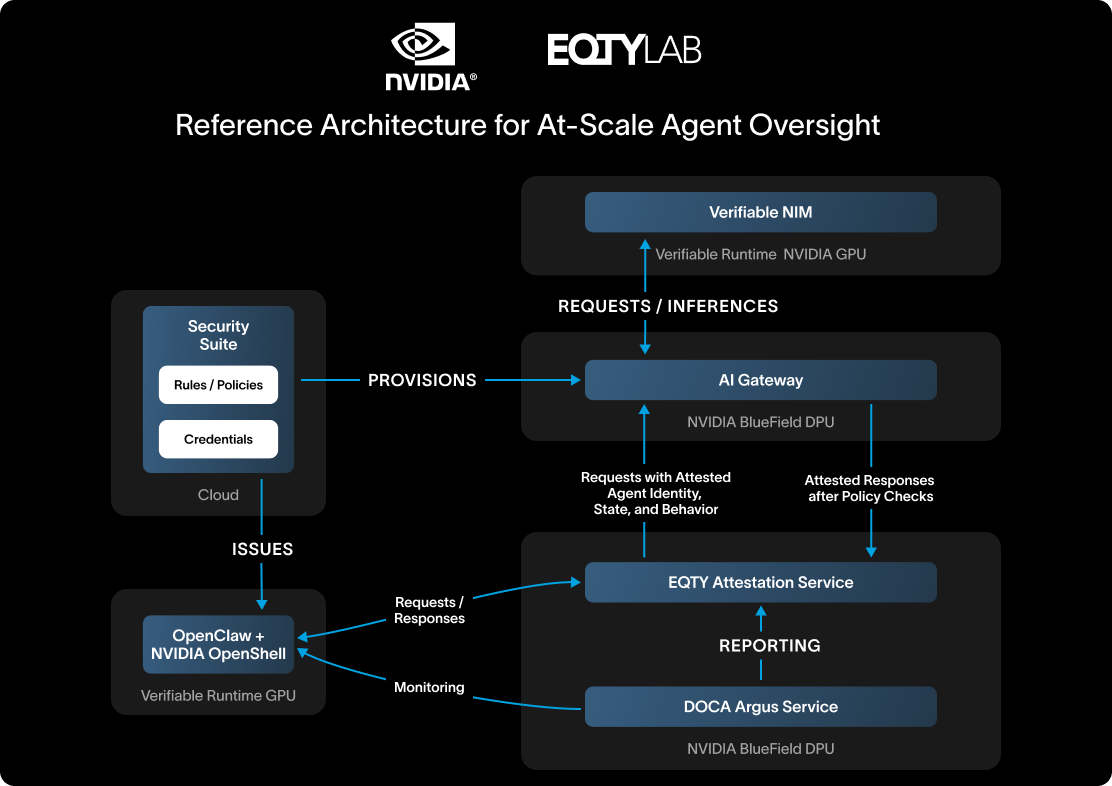
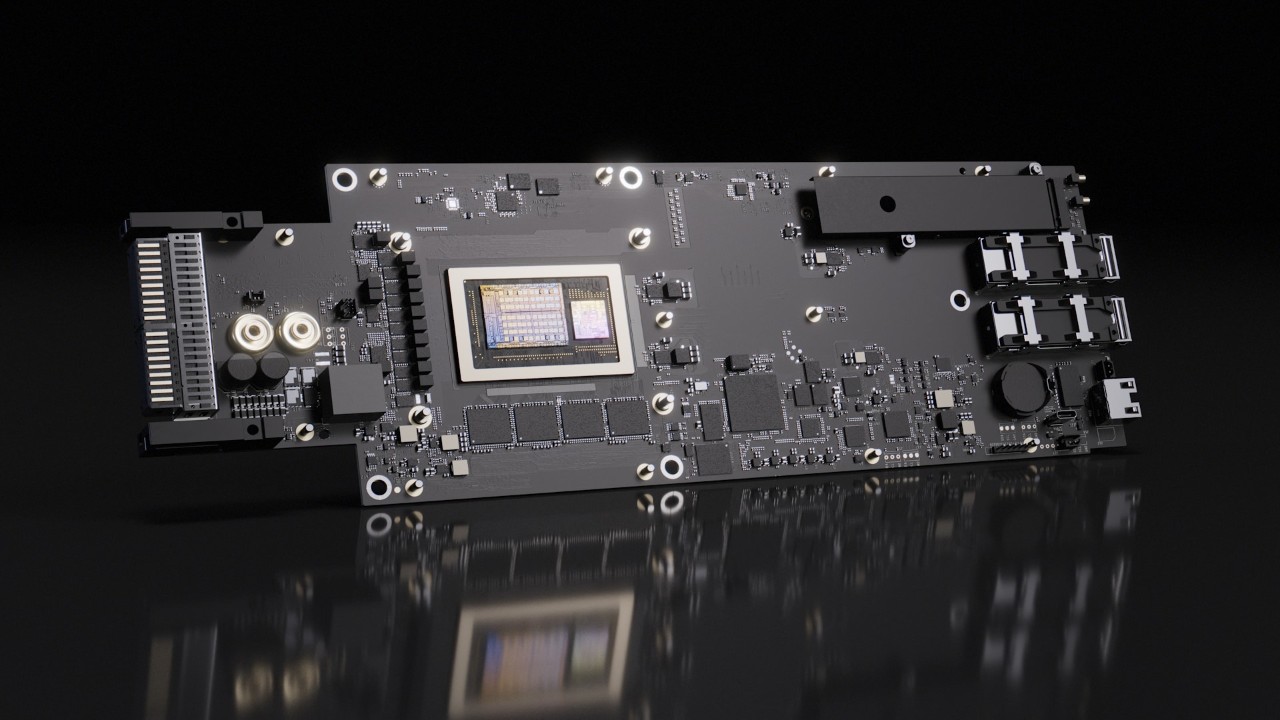
In NVIDIA’s Sentry reference architecture, BlueField-4 DPUs provide a protection layer isolated from the host. DOCA software connects monitoring and enforcement with agent identity, policy decisions and tool access. NVIDIA describes Sentry as an optional layer alongside OpenShell.
NVIDIA claims millisecond quarantine when agents cross boundaries. That is a vendor claim, not a latency result measured by Digital Pulse Brief. It should become a testable acceptance criterion for the exact infrastructure a buyer intends to use.
Ask how the protected model path is enforced, which traffic is covered and who receives an intervention alert. Also ask what happens to work already submitted to an external service. Stopping an agent cannot automatically undo a completed transaction.
The broader principle fits Zero Trust security: grant limited authority, verify access and keep enforcement independent of the workload that requests it.
NVIDIA OpenShell and AI-agent security, explained
This independent Cybernews explainer provides visual context for NVIDIA OpenShell and the security problem it is designed to address.
Availability, platform requirements and cost
NVIDIA’s launch walkthrough discusses OpenShell 0.1.0, while the live “latest” documentation consulted for this article is labeled v0.1.2. Pin a release and use its matching documentation; commands and experimental features can change.
The current support matrix lists Linux on x86_64 and Arm64, and macOS on Apple Silicon with Docker Desktop, as supported host configurations. Windows through WSL 2 and Docker Desktop is marked experimental. The matrix recommends stable releases for production use within its supported scope.
The installation guide lists Docker Desktop or Docker Engine 28.0 or later for the Docker runtime, plus separate Podman and MicroVM requirements. Check the runtime and kernel prerequisites for your chosen deployment rather than assuming any container host is sufficient.
OpenShell is distributed under Apache License 2.0. Open-source software still has operating costs: model usage, compute, storage, log retention, policy maintenance and staff time. This article does not quote a Sentry system price because no verified price for a specific configuration was established.
A practical six-step evaluation checklist

The following is Digital Pulse Brief’s suggested evaluation process, not a report of tests we performed.
- Choose one bounded workflow. Use a disposable repository or synthetic documents. Define the useful output and the actions the agent must never perform.
- Write an access inventory. List required directories, APIs, model endpoints and service identities. Separate reads from writes and keep unrelated systems out of scope.
- Confirm the installed boundary. Record the release, runtime, effective policy and provider attachments. Review exceptions before launching the agent.
- Test both success and refusal. The agent should complete legitimate work while harmless attempts at prohibited actions are blocked and explained in logs. Include a task that requests extra permission.
- Exercise recovery. Revoke access, stop the workload and check what remains in external systems. Assign an operator to review alerts and restore service.
- Expand only with evidence. Compare task completion, inappropriate approvals, blocked legitimate work, latency and operating cost. Keep a rollback path and repeat checks after material changes.
A good pilot can reject a configuration while still validating the underlying approach. If the agent only succeeds after receiving broad administrator permissions, the task design needs more work.
Who should evaluate it now?
Platform and security teams running tool-using agents have the clearest reason to investigate: they need repeatable controls across files, services and credentials. Start with a workflow whose permissions can be stated precisely and whose outputs can be reviewed.
Teams experimenting with a single assistant should first inventory what that assistant can access. Adding another platform before understanding existing permissions can create complexity without a measurable improvement.
Infrastructure buyers considering Sentry should request a configuration-specific demonstration, coverage description and operational ownership plan. Hardware independence is useful only if the deployment preserves it.
Our assessment: OpenShell’s most practical contribution is making agent authority an explicit engineering object that can be inspected and tested. The next step is a narrow, measurable pilot—not an assumption that installing a runtime has solved AI safety.
Get clear AI, technology and business insights in your inbox
Breaking developments, practical explainers, reviews and useful tech intelligence — without the noise.
 VPN vs Proxy vs Tor: What Each One Hides, What It Does Not and Which Privacy Tool Fits
  Prompt Injection Explained: Why AI Agents Can Follow Malicious Instructions and How to Reduce the Risk